Drama habits are data-hungry in a specific way: episodes are long, series are longer, and 'one more episode' is the most expensive sentence in streaming. How much data HI TV streaming app uses is decided mostly by stream quality multiplied by hours — and by whether you stream episodes repeatedly or download them once. This guide gives the per-hour figures and the budgeting habits that keep a plan intact.
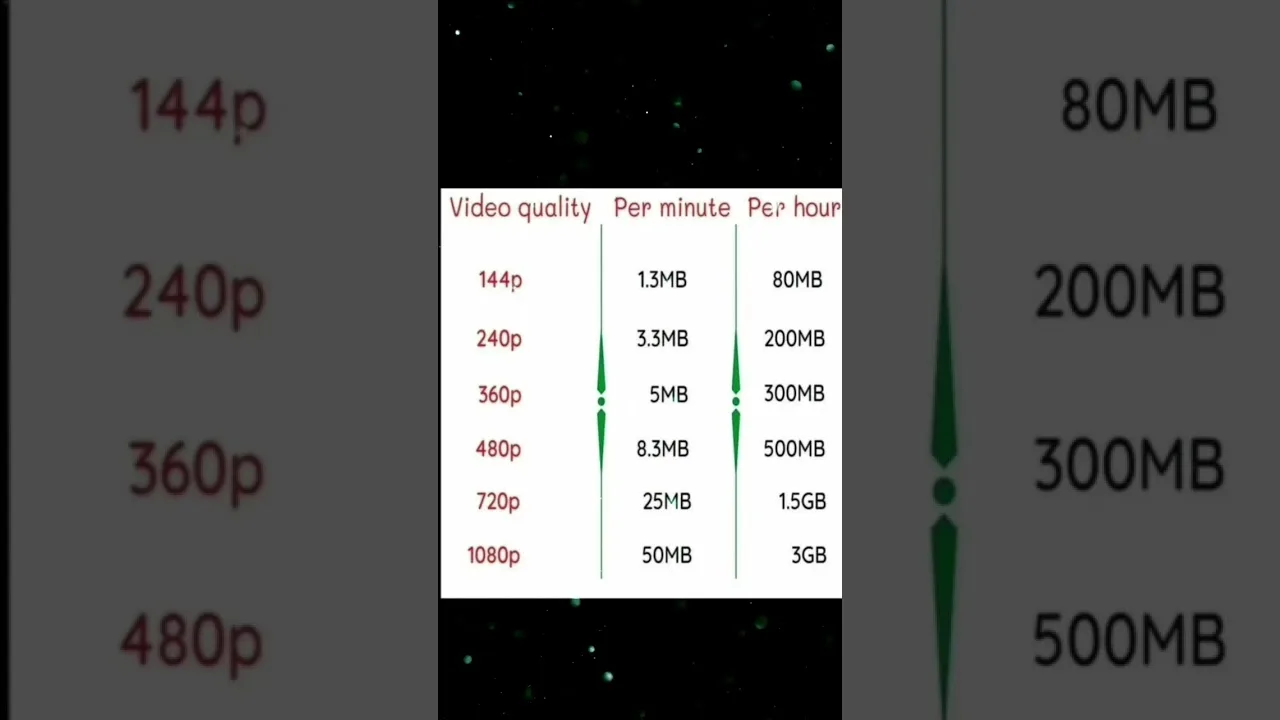
The rule of thumb: standard definition around 0.5 to 0.7 GB per hour, high definition near 1.5 GB, and top quality past 3 GB per hour. A five-episode evening in HD is therefore a serious line in a monthly budget.
Streaming vs Downloading: The Maths Differ
Streaming an episode twice costs the data twice. Downloading it once — on Wi-Fi — costs your mobile plan nothing, however many times you watch it afterwards. For favourite series and re-watches, that difference is the entire game.
Downloads have their own cost, measured in storage rather than data: roughly a few hundred megabytes per standard-definition episode. The exchange — storage at home instead of data everywhere — suits nearly everyone, and the routine is set out in our offline viewing guide.
Watch on Wi-Fi Whenever Possible
Make home Wi-Fi the default for streaming sessions and for every download. Reserve mobile data for short viewing — a commute episode already downloaded is best of all — where totals stay in hundreds of megabytes.
Be careful with automatic behaviour: an app set to download the next episode automatically is a blessing on Wi-Fi and a menace on mobile data. Confirm downloads are Wi-Fi-only in settings before a trip, not after the bill.
Track Usage in Android Settings
Android records per-app data use in Settings, under network or apps depending on the phone. Check HI TV's figure monthly and you will learn your personal per-hour rate — more useful than any generic chart because it reflects your quality choices and your series habits.
In a tight month, the per-app mobile data toggle is the reliable hard limit: restrict the app to Wi-Fi entirely rather than relying on willpower when a finale beckons.
Practical Budgets for Common Plans
On a 10 GB plan, mobile streaming is an occasional treat measured in a few standard-definition hours; downloads on Wi-Fi should carry the habit. On 50 GB, several HD episodes a week fit comfortably if the bulk of viewing stays at home. Unlimited plans remove the arithmetic, though some soften video after a threshold.
Whichever plan you hold, quality discipline is the skill, and the settings enforcing it are walked through in our best settings guide.
Final Thoughts
Data use is quality times hours, minus whatever you download once at home. Learn your rate, download favourites on Wi-Fi, and check usage monthly. Do that, and a forty-episode series will never ambush your plan.